Stop saying "I know Python."
Start showing it.
Write down the technologies you use each week, and how well you know them. Over the months, you build a record that you can show.
Start for freeOne year of a developer's record
Drag the chart left or right to explore different time periods.
- Week skipped
- Learning about technology
- Building basics
- Using regularly
- Resolving complicated problems
- Core contributor
One year of a developer's record
How it works
-
Write down your week
Select the technologies that you used this week and set a level for each one. You write it yourself, in about two minutes.
-
Your record grows
Each week becomes one column of your record, like the year above.
-
The week locks
Trekme does not check what you write. But about two weeks after a week ends, Trekme locks it. Thus you cannot write a year of weeks in one evening to match a job ad.
For developers
What your record gives you
A weekly look back
at your own work
Once a week, the form asks you what you really did. You can add a short note to each technology. When your weeks stay the same for a month, you see it. Then you can choose something new to learn.
Prefer the chat?
Tell your AI assistant
Connect Claude, Cursor, Cline, Roo Code or OpenCode to Trekme with MCP (Model Context Protocol). Tell your assistant what you used this week, and it fills in the form for you. Does your company block outside MCP servers? Ask an AI chat to make a CSV file, and upload it.
A weekly email
that keeps you going
Each week, Trekme can send you a short email with a link to the form. It shows how many weeks in a row you logged, and your rank among all users. As your streak grows, you get milestones.
See where you grow,
week by week
See which technologies you use now, which you know better each month, and which you stopped using.
Your weeks on each level,
ready for the interview
The Proficiency Summary counts the weeks on each level for each technology. In an interview, you can say "62 weeks of Python" and show each week.
Your dashboard
is your résumé
Put a short note and your reports on one page. Make it public and add its link to your CV, or print it to PDF.
Your record follows you,
not your employer
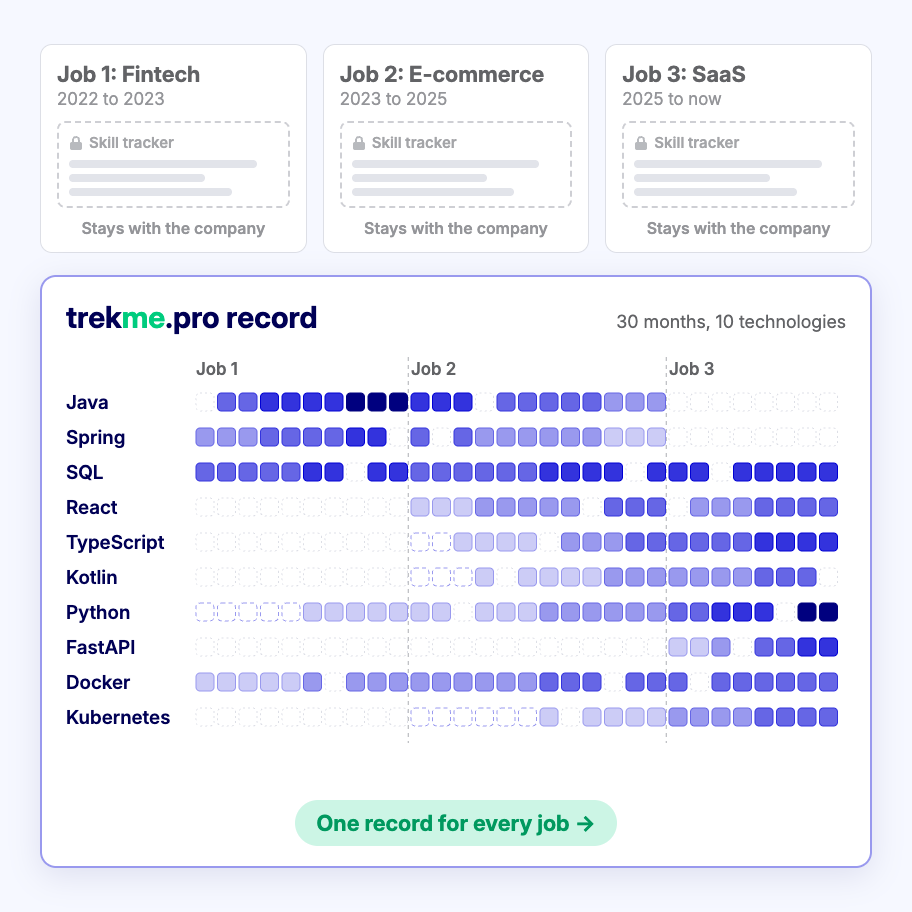
Your company's skill tracker stays with your company. Your Trekme record stays with you, with every technology from every job. Download any report as PNG or SVG.
For recruiters
Read the weeks behind the CV
A candidate can send a Trekme link with the CV. The link shows each week of their work: the technologies and the level of each one. Here is how to read it.
No account, no new tool
The link opens a dashboard in your browser. You do not sign up and you do not learn a new tool. It fits into the hiring process that you have now.
See when, not only how long
"Python, 5 years" on a CV can mean 2015 to 2020. The record shows the last week that the candidate used each technology, and the level in each week.
Too good to be true?
Eleven technologies in every week? Nobody uses that many in a 40-hour week. A record that is too good gives you your first interview question.
Better questions, not a score
A record does not replace the interview. It helps you prepare it. 16 weeks of Kubernetes on complicated problems and 4 weeks of first steps need different questions.
For IT & engineering teams
Know what your team knows
You pay a lot to build your team's skills. Then you track them in a spreadsheet that is out of date on the day you make it. Trekme shows who uses what, and it updates every week.
Find the right people
in your team
Search your team by skill. Set a technology, a minimum level and the last week of use. The best matches are at the top.
See the whole team on one page
A team dashboard puts the team reports and a note on one page.
See what training gives you
Pay for a course or a conference. Some months later, see if people still use the skill and know it better. Support your training budget with real numbers.
Find your bus-factor risks
Find the important skills that only one engineer has, before that person leaves. Then share that knowledge while you can.
Fairer growth conversations
Base promotions and reviews on the weeks that each person recorded.
Frequently Asked Questions
I already have a CV and a LinkedIn profile. Why do I need Trekme?
Keep them. They show your jobs and titles. A skill on LinkedIn has no dates and no level. Trekme adds what they cannot show: how many weeks you used each technology, and at what level.
Does Trekme read my code or watch my computer?
No. Trekme does not connect to your repositories, your IDE or your computer. It does not count lines of code or commits, and it does not rate your code. Trekme has only what you write: in the form, in a CSV file, or through your AI assistant.
I coded for years before Trekme. Does that history count?
Not at the moment. Your record starts in the week that you sign up. Your CV still shows the years before that.
Is Trekme only useful when I look for a job?
No. You can also use your record in performance reviews and when you ask for a raise.
How do we track the skills of the whole team?
We set up your team for you. Then each developer logs their own week, and the team reports update.
How is this different from our HR skills matrix or LMS?
An HR matrix or an LMS shows what people signed up for or completed. Trekme shows what your engineers use in their real work, each week.
Will my developers be OK with this?
Developers choose who can see each of their own reports and dashboards: only them, their team, their managers, or everyone. Team reports show only the team members.
Developers log their own weeks. Can I trust the team data?
Read it together with what you see each day: code reviews, tickets and team meetings. When a record and the work do not agree, start a conversation. Team reports show trends over months, not a test score.