Stop saying "I know Python."
Start proving it.

A week-by-week record of the technologies you use, and how well you know them.

Start for free

One year of a developer's record

Drag the chart left or right to explore different time periods.

  • Week skipped
  • Learning about technology
  • Building basics
  • Using regularly
  • Resolving complicated problems
  • Core contributor
Timeline
Programs NeoVim VSCode Programming languages Python Django Flask FastAPI SQLAlchemy Pydantic Marshmallow Go-lang Typescript Node Bun December November October September August July June May April March February January

One year of a developer's record

How it works

Everything you need to
own your growth

Your AI assistant
logs your skills while you code

Connect Claude, Cursor, Cline, Roo Code or OpenCode to Trekme with MCP (Model Context Protocol). Tell your assistant what you used this week. It updates your record from the chat, so you do not open another tab.
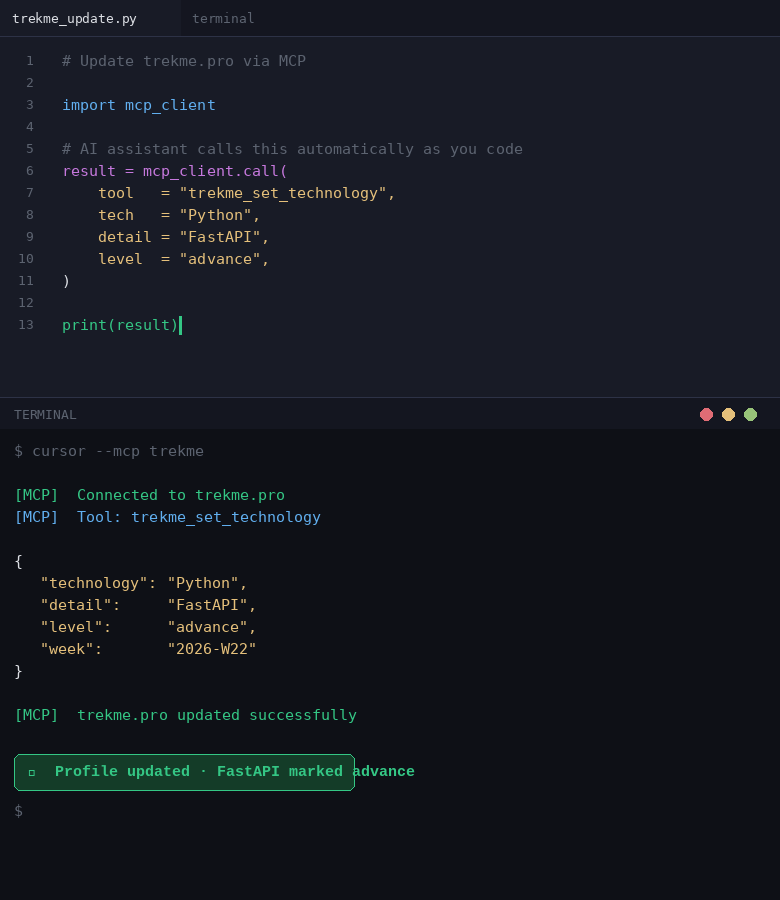
An IDE with an AI assistant that updates the Trekme record with MCP

See where you grow,
week by week

See which technologies you use now, which you know better each month, and which you stopped using.

A history you cannot
change after the fact

You log each week while you work. About two weeks after a week ends, Trekme locks it. Thus you cannot add a skill to last year to match a job ad. In an interview, you can say "62 weeks of Python" and show each week.

Your dashboard
is your résumé

Put a short note and your reports on one page. Make it public and add its link to your CV, or print it to PDF.

Your record follows you,
not your employer

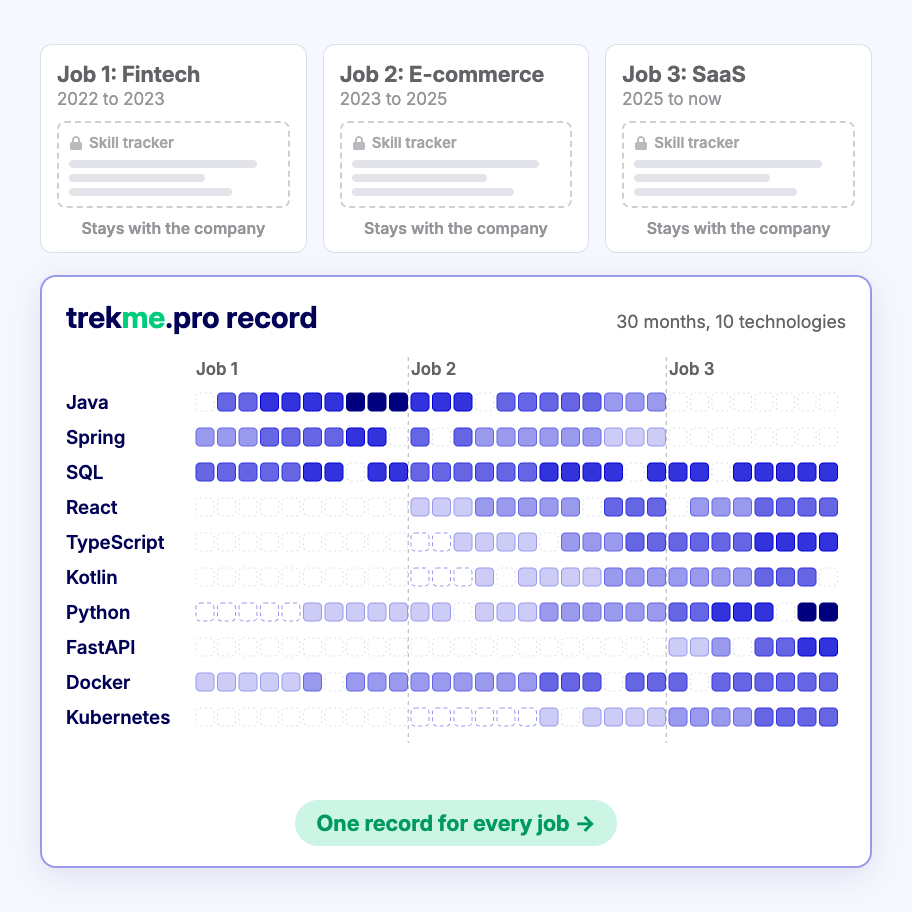
Your company's skill tracker stays with your company. Your Trekme record stays with you, with every technology from every job. Download any report as PNG or SVG.

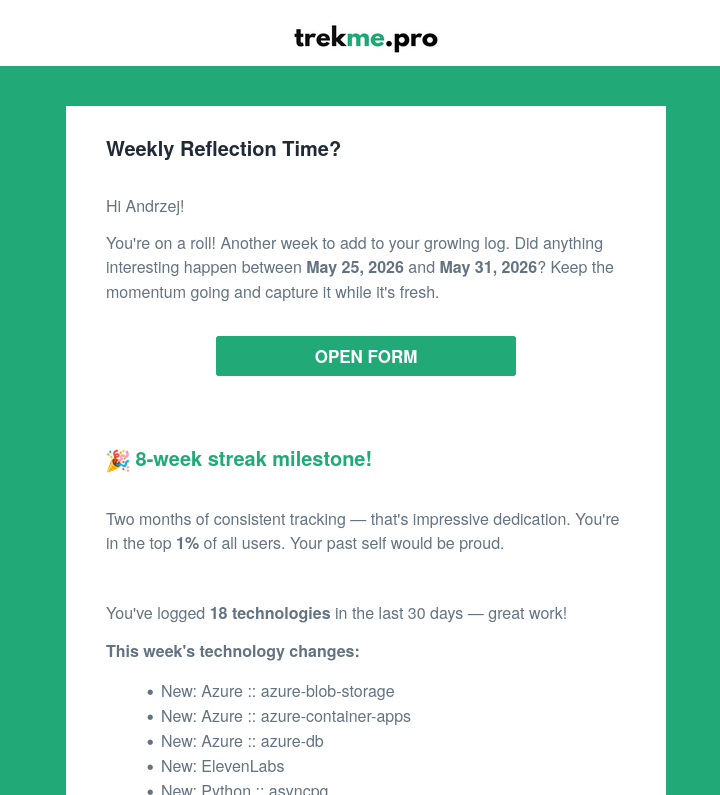
Weekly email from Trekme.pro with a streak milestone, a technology count and the new technologies of the week

For IT & engineering teams

Know what your team actually knows

You pay a lot to build your team's skills. Then you track them in a spreadsheet that is out of date on the day you make it. Trekme shows who uses what, and it updates every week.

Find the right people
in your team

Search your team by skill. Set a technology, a minimum level and the last week of use. The best matches are at the top.

See the whole team on one page

A team dashboard puts the team reports and a note on one page.

See what training gives you

Pay for a course or a conference. Some months later, see if people still use the skill and know it better. Support your training budget with real numbers.

Find your bus-factor risks

Find the important skills that only one engineer has, before that person leaves. Then share that knowledge while you can.

Fairer growth conversations

Base promotions and reviews on what people did, not on who talks the most.

Every week you wait is a week you cannot prove.

Start for free

Schedule a team demo

Got questions?

Frequently Asked Questions

I already have a CV and a LinkedIn profile. Why do I need Trekme?

Keep them. They show your jobs and titles. Trekme adds what they cannot show: how many weeks you used each technology, and at what level.

How much time does it take each week?

About two minutes. Select the technologies that you used and set a level for each one.

Is the AI assistant setup difficult?

No. Your account page shows the settings for each assistant. Copy them into your assistant one time. You sign in with OAuth, so you do not copy a key.

I coded for years before Trekme. Does that history count?

Not at the moment. Your record starts in the week that you sign up. Your CV still shows the years before that.

What happens to my record if I change jobs or stop for a while?

Your account is personal, so a new job does not change it. If you stop logging, your past weeks stay. When you start again, your record continues from that week.

Will AI make developer skills less important?

No. AI helps everyone write code faster. Now real depth makes you different: you see when the AI is wrong, and you fix what it cannot. Trekme records that depth.

Is Trekme only useful when I look for a job?

No. Most users do not look for a job. They use their record in performance reviews and when they ask for a raise.

How do we track the whole team's skills, not just individuals?

We set up your team for you. Then each developer logs their own week, and the team reports update.

How do I know our training budget is paying off?

Open a team Velocity or Proficiency Summary report for the people who took the training. Compare their weeks before the training with the weeks after it.

How is this different from our HR skills matrix or LMS?

An HR matrix or an LMS shows what people signed up for or completed. Trekme shows what your engineers use in their real work, each week.

Will my developers be OK with this?

Developers choose who can see each of their own reports and dashboards: only them, their team, their managers, or everyone. Team reports show only the team members.

Swipe to see the whole image.